2013年10月15日星期二

12 Android Apps to Replace Your Other Gadgets --(3)

Weight Watcher's Diary

Weight Watchers Diary
WWDiary takes the hassle out of tracking your points.
If you're trying to lose weight, or to maintain your weight after slimming down, you've probably considered either joining Weight Watchers or trying to follow its point system without joining. Either way, Canofsleep's free WWDiary is worth considerably more than you don't have pay for it.
Here you track the foods you've eaten in the course of a day, the exercise you've done, and the effect these have on your daily and weekly allotment of points. (In the Weight Watcher system, every food serving has points, from 1 point for a carrot to 19 points for a banana split. Based on your age, weight, and gender, you should accumulate no more than a specified maximum number points per day and per week--or you'll start accumulating unwanted reserves of cushiony lipids.) When you add a new food or a new exercise to your diary, you have the option of adding it to your Favorites list too, which simplifies adding the same things in future entries.
Specialized calculators help you determine the points associated with a food item or an exercise routine, as well as how many points you're allowed that day. You can also keep a log of your weight changes.
But don't bother with the widget--at least not at first. It simply tells you how much weight you've lost since you started using the app.
WWDiary is not officially affiliated with Weight Watchers, and it carries this disclaimer: "By using this program you agree that I am not responsible for any of your problems."

Portable Music Player

Android phones come with software for playing MP3s and other music files. But the preloaded player is pretty basic, and lots of better alternatives exist. My favorite is Maxim Petrov's PowerAMP.
As I write this, PowerAMP is a free beta. But the final version will be out very soon and will cost $5. That's a lot to pay for a program that competes with a bunch of freebies, but consider what you get for the money.
First, PowerAMP provides some awesome audio settings: a ten-band equalizer; preamp control; and separate dials for controlling bass, treble, and volume. All of these adjustments come up on a separate, highly graphical window, but you can turn any of them off or on from the main screen.
As on most other players, the main screen displays album artwork. But PowerAMP is sensitive to what you do with your fingers over that art. Flick left and it takes you to the next song. Flick right and you go to the previous one.
PowerAMP is intelligent about headphones, too. Unplug your headphones and the music stops. Plug them in again, and it restarts.
You also get your choice of three different widgets for viewing and controlling your music from the Home Screen.

Guitar Tuner

Country Joe McDonald once gave me his analysis of the difference between '60s rock and '70s rock: In the 70s, everybody's instruments were properly tuned. He credited this triumph of euphony to the invention of small, electronic devices that took the guesswork out of instrument tuning.
gString
We know what you were thinking, but gString is an app for tuning guitars.
Cohortor.org's gStrings can turn your Android phone into just such a chromatic tuner. Using the microphone, it determines whether a plucked string or a note blown through a mouthpiece has produced the correct wavelength. You can optimize the program for a specific instrument, or you can shift its results to match the tuning practices of a particular orchestra.
The free version should work just fine for most people, but for a single Euro (the equivalent of $1.41, as I write this) you can get gStrings+, which provides more-precise results and--thanks to its relatively compact code--demands less power from your phone's battery.
My wife, a professional musician and music teacher, described gStrings as "Clearly a professional tuner for many instruments."

Metronome

By supplying a regular but adjustable pulse both visually and audibly, a metronome helps musicians keep a steady beat while they practice. You can set the beat to match the piece and your comfort level with it before you start playing. Sophisticated metronomes can accent downbeats to mark the beginning of each measure.
The full version of Zealy Technology's Metronome ($1) does all of this.The free demo is just that--a demo. You can't even change the tempo on it.
With the real program, you can do that and more. You can set the app to count out anywhere from 40 to 208 beats per minute, and to add a measure-marking ping on the downbeats.
You can play the beat audibly, display it as a blinking series of lights, and receive tactile feedback via vibration. Its vibrating ability means that you can operate this metronome while it's tucked in your pocket.
In fact, by turning off the light and sound, keeping the vibration on, and parking the phone in a pocket, a musician could use it during a performance and no one else would ever know.
Lincoln Spector writes PCWorld's daily Answer Line blog. Madeline Prager provided expert opinion and analysis on the Tuner and Metronome sections.

12 Android Apps to Replace Your Other Gadgets --(2)

Alarm Clock

Your phone comes with an alarm clock app already loaded.
Alarm Clock Plus
Alarm Clock Plus is way more sophisticated than that clunky box of circuits on your night stand.
But I know a much better one. Alarm Clock Plus is, quite simply, the best alarm clock I've ever used--including physical alarm clocks of the digital, analog, and wind-up varieties.
What does Alarm Clock Plus do that the others can't? Plenty. It lets you select not just a song but a playlist, from which it will play songs at random. That means you can select 40 or 400 songs that seem right for starting the day, and be pleasantly surprised every morning. You can have it start the alarm softly and slowly increase the volume. And if you have a really hard time getting up, you can preset it not to shut up until you've solved a math problem. That should get your brain working.
You can set alarms to play once, to play every day, or to play only the days of your choice (such as on weekdays).
With all these of options, Alarm Clock Plus can be a little daunting to set up. So when you create an alarm, work through it slowly, and then use the option for testing it. The requirement to proceed methodically may explain why Brent Rose had such a different experience with it than I did.
The full version of Alarm Clock Plus costs $1.79; but if you're willing to put up with some advertising, the free version works just fine.

Compass

Compass
Catch Compass shows you the way with a variety of customizable looks.
If you're in a location where you can recharge your phone and get on a 3G network, you probably don't need a compass. But a compass is still a cool thing to have around.
Catch.com's free Compass displays a working compass on your Android phone's screen, complete with an arrow that always points north. And unlike a real compass, this one can point to due north as well as to magnetic north.
You get a choice of seven compass designs, from antique to GPS, and you can select from among various backgrounds.
The app has some cool tricks up its sleeve. For instance, you can save your current longitude and latitude as a place, and later you can bring up the place in Google Maps for directions back to it. If you're the sort of person who forgets where you parked your car--or who gets blindfolded and taken to secret hideouts a lot--this feature can come in handy.
Compass's accuracy is only as good as your phone's direction- and location-finding abilities. You may also have to move your phone in odd ways (such as in a figure 8 pattern) before you can get an accurate reading.

Notepad, Post-its, and Refrigerator Door

We all scribble things on pieces of paper--reminders, ideas, shopping lists. Then we leave them places where we'll find them or, more likely, never see them again.
You'll find plenty of note-taking apps in the Android Market, but the free AK Notepadwon my heart. In the first place, it looks great on a phone's screen--mimicking yellow, lined paper. The sans serif font looks slightly handwritten while remaining highly legible. You can edit the title of each note separately from the note itself.
After creating a note, you can do much more with it than just leave it in AK Notepad. You can set a reminder to go off in 5 minutes, in a day, or on the day and time of your choice. You can pin an icon for the note (but not, unfortunately, a widget) to your Home Screen. You can save the note as a text file, or send it to someone via e-mail, Gmail, or text messaging.

Barcode Scanner

Almost every commercially packaged product has a barcode, which can tell you more than just the price of the product in that particular store--especially if you've installedBarcode Scanner on your Android device.
Barcode Scanner
Zap a barcode with Barcode Scanner to instantly search the Web for any product.
With the app running, point your phone's camera at a bar code, and it will decode it and offer you information about the product. You may find reviews, and you'll certainly learn where else you can buy it and whether you can get a better deal.
Barcode Scanner gives you three ways to look up each product that it identifies. Its own Product Search tends to find local and online stores that offer the same item. The Web Search looks up the code in Google, thereby finding a wider variety of information. And if you have the Google Shopper app installed, Barcode Scanner can use that--though in my experience, the results are identical to those from the Product Search.
The app saves all of your scans in a history, which is good, but it doesn't do much with that history. For one thing, it merely lists numbers, without descriptions, which is not very useful. Also, as near as I can tell, you can't delete anything from the history.

12 Android Apps to Replace Your Other Gadgets --(1)

Android phones can do more than just answer calls and take pictures. Like digital Swiss army knives, they concentrate a lot of utilities into a compact, pocket-size device. Straight out of the box, your Android phone is a still and video camera, an address book, a GPS navigator, and even a phone.
But with the right apps, you can also turn it into a flashlight, a remote control, a barcode scanner, and a compass. Musicians will find that it makes an excellent tuner and metronome. And though it's already an alarm clock and a music player, it can get better at these tasks with the right software.
Here are 12 apps--all of them available from the Android Market and most of them free--that can turn your phone into an even better multipurpose device.
But not a perfect one. I'm still looking for the right Phillips screwdriver app.

Flashlight

DroidLight
DroidLight turns on your phone's camera flash LED to light your way.
Have you ever watched someone trying to read in the dark by the blue glow of their cellphone's screen? Have you ever been that person?
With Motorola's DroidLight, those days are over. Launch this app, and your phone's camera LED will come on and light the way. DroidLight's user interface is transcendently simple: An illustration of an old-fashioned, incandescent light bulb. Touch the bulb to turn the light on or off.
One caveat: Make sure that you go to another program or return to the Home Screen before putting away your phone. Otherwise, you might accidentally turn the beam back on, and it will light up the inside of your pocket until the phone's battery dies.
The DroidLight requires a camera with flash, of course; and it doesn't work on all such phones. It's most dependable on Motorola phones, but it does work on some others, as well. And since it's free, there's no risk in trying it.

Tape Recorder

Your phone has a microphone and a memory. Why shouldn't you be able to use it to record verbal reminders, conversations, and even live music?
Though there are plenty of recording apps for Android, I recommend the freeRecForge Lite and its $6 big sibling, RecForge. (Until very recently, both versions went by the name AudioRecorder.) The lite version is fine if you're making recordings of less than 3 minutes each.
Either app gives you a host of options for handling the recording you want to make. At its default setting it saves recordings as .mp3 files, but you can choose instead to record .wav or .ogg files. Available sample rates range from low-fi but understandable 8KHz to CD-quality 44KHz, and you can choose to record in mono or in two-track stereo.
Once you've recorded something, you can attach an additional recording to the end, convert it to another format, or share it via e-mail, Gmail, Bluetooth, or text message. Don't get too excited about the Edit option on the menu, however: That's just for file manipulation; you can't edit the audio in RecForge.
Bear in mind, too, that in most places, recording conversations or performances without permission is illegal.

TV Remote Control

I wish I could recommend an app that would turn your Android phone into a universal remote control. But that won't happen any time soon. The problem is that phones don't emit infrared signals--the preferred interface between remotes and the devices they control.
Boxee WiFi Remote
This Wi-Fi remote handily controls the Boxee set-top box.
There are a few of exceptions, all of them involving controls for devices that plug into your home network as well as into your TV. By turning on your phone's Wi-Fi connection, you can control the device over the LAN.
I gave the free Boxee Wifi Remote a whirl. If you've attached a computer to your television so that you can watch movies and TV shows via your Boxee account, this program will permit your phone to function passably as a remote control. It's reasonably straightforward and it works, navigating through the menus with simple on-screen controls, and it even uses your phone's volume control for Boxee.
Running Boxee involves entering text occasionally--for instance, if you want to search for a title or an actor. If you've ever tried to enter text with a conventional remote control, you know how much easier it is to use your phone's keyboard instead. And that's despite the fact that the Boxee Web remote got confused when I tried using Swype with it.
The developer told me that he has not yet tested this app with DLink's upcomingBoxee Box, but he thinks that it should work.
Since I don't own a TiVo, I wasn't able to test Tim Hoeck's TivoRemote. The app costs $1 and is supposed to work with Tivo Series3, HD, or Premiere DVRs.

Remote Keyboard and Mouse

You can control your computer from your Android phone, even if you aren't watching Boxee.
The free, open-source RemoteDroid uses your network and Java to ast as another keyboard and mouse for your Windows PC. Preliminarily, you'll have to install the Java SE runtime environment on your the computer and then run the RemoteDroid Server software. And of course, you'll have to turn on your phone's Wi-Fi and get it onto the network.
Once you've taken care of those steps, you'll find the user interface minimal but intuitive: You use the big rectangle as a touchpad; the two smaller rectangles are buttons; and (as you'd expect) the keyboard icon brings up the keyboard.
RemoteDroid doesn't support Swype, unfortunately. But it does let you lean back and control your computer without having to touch it. And if you hook up your computer to your TV, the app works with Windows Media Center.

Five Android-only apps to make iPhone users jealous

Temple Run, Instagram, Flipboard, Vine, Angry Birds...sometimes it seems like all the great apps start on iOS before making their way to Android. But not all apps start their life inside of Apple’s walled garden—some have launched on Android first and have yet to make their way to iOS. While iPhone users are often first to experience the latest games, Android users get apps that fully automate their phones and predict what they want to type next.
Here are five apps that Android users can brag about to their iPhone-toting friends.

Tasker ($3)

Tasker (Click to view full image)
Tasker helps make your smartphone actually feel smart. The app lets you create profiles that automatically execute certain tasks when specific criteria are met. For instance, you can have your phone automatically launch the music app when you plug in headphones, or have your phone silence itself when you get to the office. There’s really no limit to the types of profiles you can create, and there are entire websitesdedicated to Tasker profiles if you’re not up to the task of creating one yourself.
The app does have a bit of a learning curve, though, so I’d recommend going throughthe tutorial or looking one up online to get down the basics. There’s a lot of trial and error involved when building your first Tasker profile, but there’s an unmatched feeling of joy when all your hard work finally pays off.
Sure the idea of automating your phone sounds nerdy, but it’s unequivocally cool to have your phone automatically respond to text messages while you sleep.

Astro File Manager (Free)

Astro File Manager (click to view full image)
If you’ve ever created a file on your iPhone or iPad, you know what a huge pain it can be to move it off of the device. You have to either plug it into iTunes to retrieve it or hope that you have an app installed that works with the app you used to create the file in the first place. It’s way more convoluted than it should be.
While I’m not saying Android is any better when it comes to creating documents, it certainly is better at managing them. Astro File Manager gives you access to all of the data stored on your phone. The app lets you move folders and files around your phone’s internal memory and SD card, and you can also connect to your Box, Dropbox, and Google Drive accounts to move your files between your phone and the Internet (aka the cloud).
The app even has a memory manager so you can see which apps are taking up the most space on your phone so you can address them accordingly. You can also use Astro File Manager to back up your apps (and their data) to your MicroSD card—handy in case you need to reset your device or switch to a new one.

AirDroid (Free)

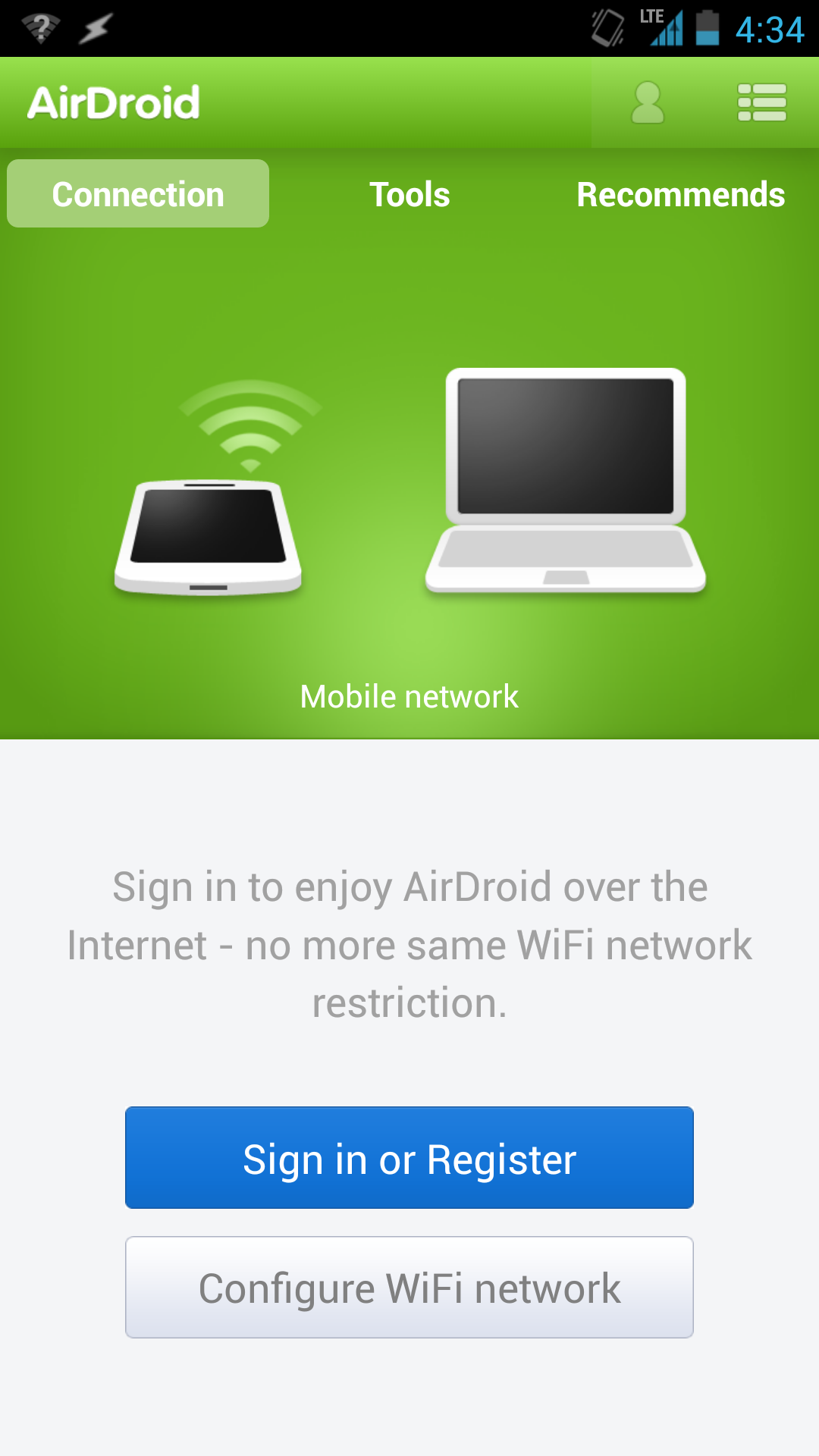
AirDroid (click to view full image)
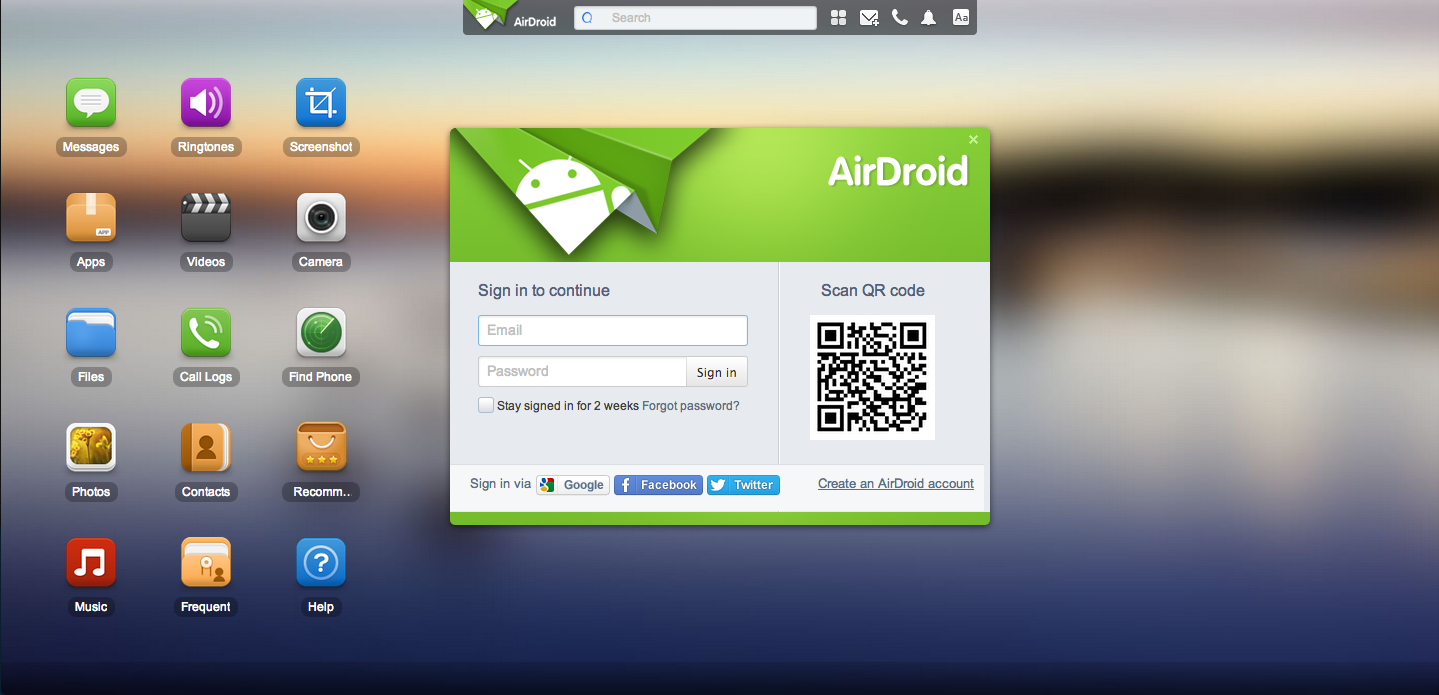
With AirDroid, you don’t even need to touch your phone in order to use it. The app lets you access your phone remotely by going to web.airdroid.com and scanning the QR code on the page. The free version of the service lets you do things like reply to text messages, organize your photos, and play music, while the paid version lets you remotely access your camera and helps you locate a missing or stolen device.
AirDroid web view.
If you’re not one to carry a Micro-USB cable everywhere you go, AirDroid also lets you transfer content to and from your phone without ever having to plug it into your computer. (Just make sure you’re on Wi-Fi if you’re planning on moving over gigabytes of data.)
So why exactly would you want to access your phone on your computer? Aside from all the benefits I listed above, the number one reason to do it would be because you left your phone out of arm’s reach and are too lazy to get up to answer a text message. And there’s nothing wrong with that.

SwiftKey ($4)

SwiftKey (click to view full image)
Say farewell to typos. SwiftKey is a third party keyboard app that adapts to the way you write by learning which words and phrases you use most often, allowing for a better typing experience because your phone isn’t constantly autocorrecting “Yo” into “to”. After a while, you get to the point where you can mash your thumbs randomly on screen and have SwiftKey predict exactly what you wanted to say, punctuation and all. Neat.
For those of us out there that find typing passé, SwiftKey has a feature called Flow that lets you glide your fingers over keys to form words and sentences (kind of likeSwype). SwiftKey also supports multiple languages simultaneously, so you don’t have to go into the settings every time you want to switch the keyboard language from English to French, and the app comes with several themes to change how the keyboard appears on screen.

Nova Launcher ($4)

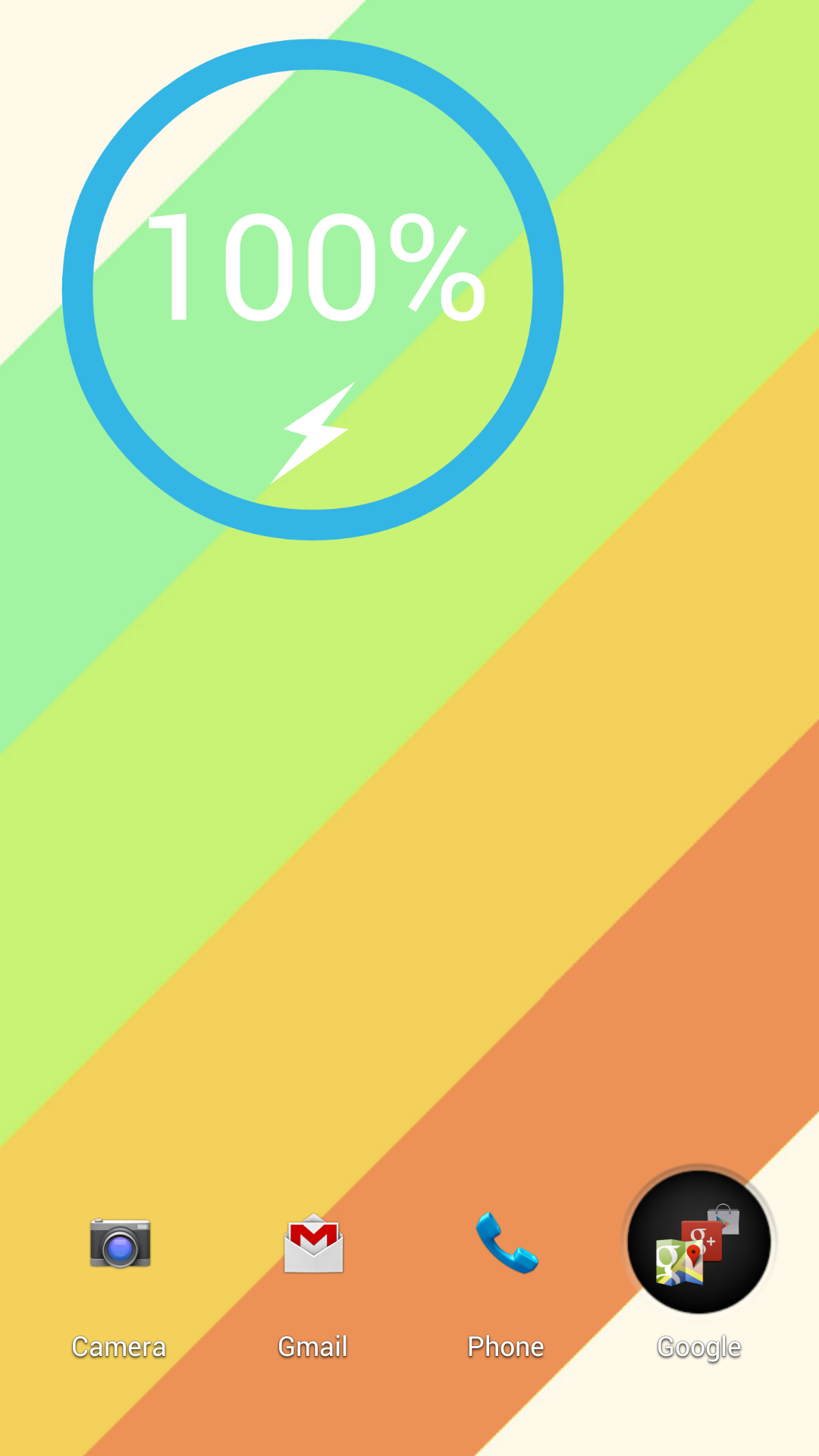
A home screen customized with Nova Launcher.
Shouldn’t your phone look the way you want it to? With Nova Launcher, you can customize your Android home screen to give it a unique look that’ll be the envy of everyone on your block. The app makes it easy to change your app icons, app drawer, and home-screen animations to something more in line with your artistic vision, and there are plenty of premade themes available on the Play Store (if you’re feeling lazy).
There are also websites and forumswhere people post their Android home-screen designs and tell you how you can achieve the same look—handy if you’re looking for some inspiration. On my home screen that you can see here, I hid the dock and the notification bar to give my phone a super minimalistic aesthetic. Try doing that on an iPhone.

A new hope?

While it’s unlikely that Apple would ever let something like Nova Launcher or Astro File Manager into the App Store, there’s still some hope for the rest of these apps. Apple is opening up more of the iOS APIs to developers, so it’s possible that we could see a SwiftKey or AirDroid on iPhones sometime in the near future.
Most of these apps don’t exactly have mainstream appeal, but they push the boundaries of what your phone can do and can help make your life easier.

2013年10月14日星期一

SQU-415 battery for Gateway M280 CX200 CX2000 Series 3600mAh

SQU-415 battery for Gateway M280 CX200 CX2000 Series

We provide replacement GATEWAY SQU-415 laptop battery. It is replacement for your GATEWAY SQU-415 battery with high quality. The GATEWAY SQU-415 Laptop Battery is designed to be 100% manufacturer compatible with GATEWAY part numbers or models.
SQU-415 AHA63218436 6500985 916C5680F
Click to enlarge

(Item Code: GA3956)

UL, CSA, ETL, and CE Certifications
GATEWAY SQU-415 laptop battery

laptop battery

100% Guarantee Quality and Fully Test!
Trusted store with over 20000 satisfied customers!
battery-notebook.com is an Accredited Retailer
Browse our sister sites in Europe: Batterie pour ordinateur portable Baterías para ordenador portátil Batteria per portatile laptop battery
Battery Type: Li-ion
Color: black
Dimension:
Capacity: 3600mAh
Volt: 10.8V
Original Price: US $118.75
Special Price: US $:95.00
IN STOCK (Updated On October,2013)
  • Brand New,1 year Warranty!
  • shopping with us is safe and secure!
  • 30 Day Money Back,fast shipping 3-5 days arrive!Good online service!
  • Shipping To Worldwide!
  • Usually ships the same business day!
  • Save more money in our website!
All our discount GATEWAY SQU-415 laptop batteries are brand new, high capacity, li-ion, rechargeable and made with high quality cells. replacement for Gateway M280 CX200 CX2000 Series laptop batteries are guaranteed to meet or exceed OEM (original) specifications backed by 1 year warranty,30 days money back guarantee and fast shipping 3-5 days arrive.
Description:
Replace battery part number: This battery is also compatible with the following models :

If your GATEWAY SQU-415 AHA63218436 6500985 916C5680F laptop battery is failing or your notebook battery is out of power and you have to let your laptop go on working, you should go for a high quality battery urgently and it is not very expensive, maybe you feel like to order a replacement GATEWAY laptop battery online. We will tell you how to purchase a replacement GATEWAY SQU-415 AHA63218436 6500985 916C5680F battery online.

  • GATEWAY SQU-415 laptop battery uses the highest quality cells.
  • GATEWAY SQU-415 laptop battery 100% Q.C. of EVERY product. Extended run time.
  • Price Match Guarantee!Excellent Service,Delivery Fast if you order the GATEWAY SQU-415 laptop battery.
  • 30 Days Money back warranty for GATEWAY SQU-415 laptop battery!
  • GATEWAY SQU-415 laptop battery will arrive you in the 3 to 5 business days with tracking number !
  • 1 year Warranty Free Replacement for GATEWAY SQU-415 laptop battery.
  • brand new, rechargeable Li-ion GATEWAY SQU-415 battery for Gateway M280 CX200 CX2000 Series .
  • If you need the battery for Gateway M280 CX200 CX2000 Series , please do not just see it, and buy it on battery-notebook.com. We will offer you the best quality Gateway M280 CX200 CX2000 Series battery with the cheapest price!
  • If you need another GATEWAY laptop battery for your model, and you could not find it on our website, please contact us. Our customer service professional may be able to find the product or information that you are looking for or help you refine your search.

Laptop Batteries pack online sales

A32-K93 A41-K93 A42-K93 battery for ASUS K93 K93S K93SV Series 5200mAh/56WH/6Cell

A32-K93 A41-K93 A42-K93 battery for ASUS K93 K93S K93SV Series

We provide replacement ASUS A32-K93 A41-K93 A42-K93 laptop battery. It is replacement for your ASUS A32-K93 A41-K93 A42-K93 battery with high quality. The ASUS A32-K93 A41-K93 A42-K93 Laptop Battery is designed to be 100% manufacturer compatible with ASUS part numbers or models.
A32-K93,A41-K93,A42-K93
Click to enlarge

(Item Code: AU3400)

UL, CSA, ETL, and CE Certifications
ASUS A32-K93 A41-K93 A42-K93 laptop battery

laptop battery

100% Guarantee Quality and Fully Test!
Trusted store with over 20000 satisfied customers!
battery-notebook.com is an Accredited Retailer
Browse our sister sites in Europe: Batterie pour ordinateur portable Baterías para ordenador portátil Batteria per portatile laptop battery
Battery Type: Li-ion
Color: black
Dimension:
Capacity: 5200mAh/56WH/6Cell
Volt: 10.8V
Original Price: US $106.25
Special Price: US $:85.00
IN STOCK (Updated On October,2013)
  • Brand New,1 year Warranty!
  • shopping with us is safe and secure!
  • 30 Day Money Back,fast shipping 3-5 days arrive!Good online service!
  • Shipping To Worldwide!
  • Usually ships the same business day!
  • Save more money in our website!
All our discount ASUS A32-K93 A41-K93 A42-K93 laptop batteries are brand new, high capacity, li-ion, rechargeable and made with high quality cells. replacement for ASUS K93 K93S K93SV Series laptop batteries are guaranteed to meet or exceed OEM (original) specifications backed by 1 year warranty,30 days money back guarantee and fast shipping 3-5 days arrive.
Description:
Replace battery part number:
This battery is also compatible with the following models :

If your ASUS A32-K93,A41-K93,A42-K93 laptop battery is failing or your notebook battery is out of power and you have to let your laptop go on working, you should go for a high quality battery urgently and it is not very expensive, maybe you feel like to order a replacement ASUS laptop battery online. We will tell you how to purchase a replacement ASUS A32-K93,A41-K93,A42-K93 battery online.

  • ASUS A32-K93 A41-K93 A42-K93 laptop battery uses the highest quality cells.
  • ASUS A32-K93 A41-K93 A42-K93 laptop battery 100% Q.C. of EVERY product. Extended run time.
  • Price Match Guarantee!Excellent Service,Delivery Fast if you order the ASUS A32-K93 A41-K93 A42-K93 laptop battery.
  • 30 Days Money back warranty for ASUS A32-K93 A41-K93 A42-K93 laptop battery!
  • ASUS A32-K93 A41-K93 A42-K93 laptop battery will arrive you in the 3 to 5 business days with tracking number !
  • 1 year Warranty Free Replacement for ASUS A32-K93 A41-K93 A42-K93 laptop battery.
  • brand new, rechargeable Li-ion ASUS A32-K93 A41-K93 A42-K93 battery for ASUS K93 K93S K93SV Series .
  • If you need the battery for ASUS K93 K93S K93SV Series , please do not just see it, and buy it on battery-notebook.com. We will offer you the best quality ASUS K93 K93S K93SV Series battery with the cheapest price!
  • If you need another ASUS laptop battery for your model, and you could not find it on our website, please contact us. Our customer service professional may be able to find the product or information that you are looking for or help you refine your search.

Laptop Batteries pack online sales